Alternatives — brand or specification
Hikvision Camera Alternative for Commercial Building CCTV Systems
Most buyers arrive here holding a quote rather than a broken system. The useful questions are narrow: what a like-for-like swap changes in your bill of materials, what it changes in the app your guards use every day, and what the price difference actually consists of. We publish our own specifications and pricing; we do not publish claims about other manufacturers’ products that we cannot document.
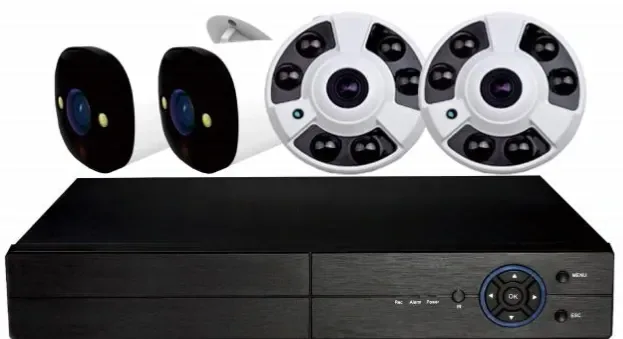
- ONVIF, RTSP and GB28181 — existing equipment keeps working
- 5 MP full colour cameras, colour to 0.1 Lux at F1.0
- PoE switches at 120 W / 250 W / 320 W, NVRs from 10 to 64 channels
- One bill of materials, priced line by line
What an alternative has to replace
A building CCTV system is a chain: cameras, PoE switches, CAT6 cabling, a recorder, and the client that somebody actually watches. When people ask for an alternative to a brand they already have, they rarely mean all five links at once. They usually mean one of them — the cameras that are failing, the recorder that is out of support, or the app that nobody can log into any more.
That distinction decides the cost of the whole exercise, so we start there rather than with a product. If your cameras are sound and your recorder is the problem, replacing the recorder is a network configuration job. If the cabling and PoE layer is sound, the cameras can be swapped without touching a single cable run. The expensive version of a migration is the one that replaces everything because nobody separated the layers before the budget was written.
Compare the bill of materials, not the badge
A brand name is not a specification, and a specification is what your building ends up living with. Buyers who compare CCTV camera brands on reputation alone tend to redo the exercise a year later; buyers who compare rows do not. This is what our range provides at each link, and the questions to ask of any quote you are holding — ours included:
| Link in the chain | What our range provides | What to check in any quote |
|---|---|---|
| Cameras | 5 MP at 2880 × 1620 on a 1/2.7-inch low-light CMOS sensor, F1.0, colour down to 0.1 Lux, H.265+ main stream 500–8000 kbps at 25 fps | Resolution, minimum illumination in colour mode, aperture, frame rate at night, and whether an enclosure and bracket are inside the price |
| Power and cabling | PoE switches at 120 W, 250 W and 320 W budgets, with 250 m extend mode on the PS series, plus CAT6 for the runs | Total PoE wattage against camera count, cable lengths against the 100 m limit, and whether the cable is in scope or excluded |
| Recording | 10, 16, 32, 49 and 64-channel recorders, one to eight drive bays, up to 14 TB or 18 TB per bay, H.265+, 4K HDMI out | Channel count against camera count, access bandwidth, bay count, drive model and who supplies the drives |
| Client and remote access | Seetong Cloud clients on iOS, Android and Windows, with P2P / NAT traversal for remote access and ONVIF, RTSP, GB28181 for third-party platforms | How remote access is reached, how many user accounts you need, and what happens to those accounts when the platform changes |
| Branding | Logo placement on the outer carton, the device case, the channel display page and the boot screen | Whether branding is contractual and where the logo is allowed to appear, and what the client app is called on the app store listing |
Seetong Cloud is the platform layer that ships with this range. It is not a consumer brand you will see advertised in Europe, Africa or South Asia, so we describe it by what it does rather than by name: it speaks ONVIF, RTSP and GB28181, and it runs on iOS, Android and Windows.
Where a price gap comes from
When two quotes for the same building sit far apart, the difference almost never comes from one line. It comes from four places, and all four are visible if you ask for the right documents.
- Brand premium — the part of the price that exists because the name is recognised in the market. Ask what the same specification would cost with the name removed from the box.
- Agent layers — factory to national distributor to regional reseller to installer. Each layer carries a margin, a credit cost and a stock cost, and each one is a line you are paying for whether or not it adds work.
- System binding — controllers, licences, activation steps or matched accessories that only fit one ecosystem. List every item on the quote that has exactly one possible supplier.
- Scope definition — wired against wireless, who does the civil work and the cable runs, whether drives and enclosures are inside the number, and how long the warranty actually runs for.
A project quote comparison we can share on request — configuration and date in the appendix — covers one African commercial building project, one device list and two quotes. It is the reason this page insists on the bill of materials rather than the badge.
What you give up, stated plainly
A migration is not free, and the costs are usually in the convenience layer rather than the hardware. These are the ones buyers report after a swap:
- Two device lists instead of one, if you keep some of the existing estate and add ours alongside it. Both work; you will look in two places.
- Platform-level features you may already have licensed elsewhere — analytics modules, cloud storage plans or integrations built around the incumbent ecosystem.
- A single warranty path. A mixed estate means two suppliers, two return addresses and two lead times for spares, unless the whole system is replaced in one go.
- Technician familiarity. Your installers know one menu tree better than the other; allow a commissioning day for the change.
- The app cannot be re-branded for you. Logo placement covers the carton, the case, the channel display page and the boot screen, but the client application itself is supplied by the platform and keeps its own name.
How to run the comparison fairly
Send us the bill of materials you were quoted. We will price the same list, line by line, and return a two-column comparison with the scope differences marked rather than a single number that flatters us. If the difference turns out to be small, we will say so — a short conversation now is cheaper than a failed handover later.
Then do the same thing in the other direction. Ask the other supplier to quote our list. Ask both sides the same five questions: minimum illumination in colour mode, channel count against camera count, bay count and drive capacity, what is excluded from the labour scope, and what the warranty covers and for how many years. Two quotes answered on those five questions are comparable. Two quotes answered on brand and price are not.
If you would rather keep your existing cameras and change only the recorder, that is a different and usually cheaper route — the NVR migration page walks through it step by step.
What we will and will not claim
We publish our own specifications and pricing; we do not publish claims about other manufacturers’ products that we cannot document. That is a deliberate position rather than a legal formality. Comparisons about someone else’s firmware, someone else’s sensor or someone else’s failure rates are almost always out of date by the time they are printed, and a buyer who checks will find the claim rather than the fact.
So this page compares on two things only: the specification we publish for our own range, and the price we quote for the list you send. Where we are asked a question about another brand, we will say we do not have a documentable answer, and we will suggest the test you can run instead. If a supplier tells you something negative about our range, ask them for the document — and do the same with anyone who does it to them.
Three migration routes, and when each one is right
Cameras only
The recorder, the client and the cabling stay where they are. You replace the camera positions that are failing, or that need colour at night, and keep everything else. Existing recorders usually accept the new cameras over ONVIF or RTSP.
- Use when
- Buildings whose recorder is modern and supported, where the pain is at the camera positions — night image quality, dead channels, ageing units.
- Not when
- Sites where the recorder is the part that is out of support or out of capacity. You would be fixing the wrong end of the chain.
Recorder and client only
Existing IP cameras register on the new recorder over ONVIF, RTSP or GB28181 and keep recording. You change where the footage lands and how it is watched, without touching a camera on the wall or a single cable run.
- Use when
- Sound cameras, an ageing or unsupported recorder, and a need to move the app or the account layer onto something current.
- Not when
- Estates whose cameras do not publish a standard stream — analogue units, or models locked to a proprietary protocol. Check the camera list before counting this route.
The whole system in one go
One bill of materials, one client, one warranty path and one commissioning visit. It costs more up front than a partial migration and removes the two-device-list problem entirely.
- Use when
- New buildings, fit-outs, and estate-wide refreshes where a single maintenance story is worth more than reusing hardware.
- Not when
- A budget that would have to be cut in the PoE or storage layer to make it fit. Specify the switch wattage and the drive bays first; they are the parts that cannot be stretched later.
Frequently asked questions
Can I replace Hikvision cameras without replacing the recorder?
In most cases yes, if the recorder accepts third-party cameras over ONVIF or RTSP — which is how the majority of modern network recorders are designed to work. What you lose is the single-ecosystem convenience: one app, one password, one firmware path. You will also want to check two practical things before you buy. First, that the recorder has a spare channel licence for each new camera, because some platforms license channels separately. Second, that the recorder can handle the resolution and compression you are adding, since a 5 MP H.265+ stream can exceed what an older recorder was sized for. Send us the recorder model and we will tell you plainly whether the mix is workable.
Are your cameras and recorders compatible with Hikvision equipment?
Our cameras speak ONVIF, RTSP and GB28181 and stream H.265+ / H.265 / H.264, and our recorders accept cameras that publish a standard stream — which is the same basis on which most cross-brand integration is done. We do not publish claims about another manufacturer’s firmware or feature behaviour, so we will not tell you which of their menu options will or will not work. What we do instead is concrete: send us the model list and we will confirm from the stream profiles which functions survive the mix, and we will flag the ones that do not before you order.
Why can one quote be far higher than the other for the same building?
Four things, and they are all checkable. Brand premium: what a recognised name adds to a specification that is otherwise identical. Agent layers: every distributor and reseller between the factory and your site carries a margin, a credit cost and a stock cost. System binding: controllers, licences and matched accessories with exactly one possible supplier. Scope: wired against wireless, who does the civil work, and how long the warranty runs. We break all four down with a worked case on the quote comparison page, including a two-column appendix we can send you. The point of the exercise is not that one number is smaller — it is knowing which part of the difference you are actually buying.
Will our operators need retraining on a different platform?
Less than you would expect. The daily tasks are the same everywhere: open the client, look at a grid, click a channel, scrub back through a timeline, export a clip. Our recorders publish 1/2/4/6/8/9/10/16 split layouts on the display output, and the client runs on iOS, Android and Windows, so the layout habits transfer. What does need a session is the administration side: user accounts — the recorder supports up to 38 local users — recording schedules, motion zones and notification rules. Budget half a day with whoever will own the system, and write the account list down before the handover rather than afterwards.
Does your range have features Hikvision does not?
We do not answer that question, and you should be sceptical of any supplier who does. We cannot document another manufacturer’s current firmware, menus or specifications, so anything we said would be a guess dressed as a fact. What we can do is state our own specification and stand behind it: 5 MP cameras with a 1/2.7-inch low-light sensor and an F1.0 aperture, colour down to 0.1 Lux, H.265+ at 500–8000 kbps, PoE switches from 120 W to 320 W, and recorders from 10 to 64 channels with up to 18 TB per bay. Compare those numbers with the numbers on the quote in front of you, and ask us for sample footage rather than a claim.
What happens to warranty and support if I mix brands?
You end up with two warranty paths, and that is worth planning rather than discovering. Each supplier covers the equipment it supplied; nobody covers the seam between them. So keep a simple asset list: for every camera and recorder, the model, the supplier, the purchase date and the warranty end date. When something fails you will know who to call in under a minute instead of an afternoon. Our own support runs remotely — commissioning help over WhatsApp or a remote session, plus firmware and configuration support after handover — and we will tell you up front which parts of a mixed system we can support and which belong to the other supplier.
How do I check that two quotes are genuinely like for like?
Put the two device lists side by side, one row per line, and mark four columns: specification, quantity, unit price and scope. Then check the five items that hide most of the difference — minimum illumination in colour mode, channel count against camera count, drive bays and capacity, what the labour scope excludes, and the warranty length and what it covers. Anything a quote does not state is a question, not an assumption. We will do this on your list and send it back as a two-column comparison, so the gaps are visible rather than argued about, and if our price advantage disappears once the scopes are aligned we will tell you that too.
Send us the bill of materials you were quoted
We will price the same list line by line and return a two-column comparison with the scope differences marked. If your existing recorder can stay, we will tell you that as well — the recorder route is often the cheaper one.