Power & Cabling · 8 port
8-Port PoE Switch — PS082 and 1011GB
Eight PoE ports, two gigabit uplinks and a 250 m extend mode, sized for a small office, a clinic floor, a shop or a single building entrance group.
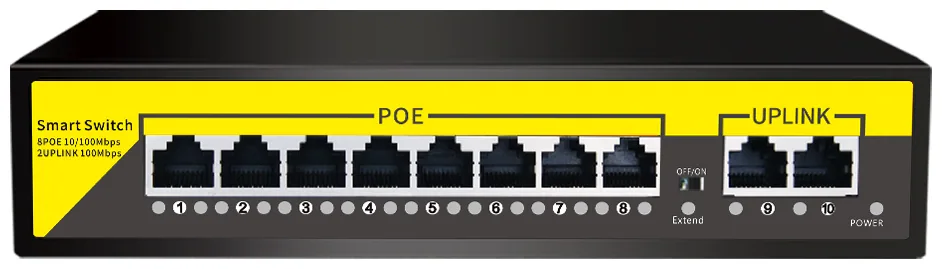
- 8 PoE ports
- 120 W class budget
- 250 m extend mode
- No configuration needed
Where eight ports is the right answer
Eight ports suits a site with up to eight devices: a small office, a clinic floor, a shop with a back room, or an entrance group of gate, lobby and car park cameras. It is also the natural size for a satellite switch feeding a group of cameras on a distant part of a large site.
The mistake to avoid is buying eight ports for a site that will obviously grow to twelve. A second switch means a second uplink, a second power point and a second device to document. Buying the sixteen port model once is usually cheaper over three years than buying eight ports twice.
The 120 W budget in practice
A 120 W class budget comfortably powers eight fixed 5 MP cameras with headroom. It fills up faster if you add a PTZ dome, a heater or a wireless access point, because those devices draw considerably more than a fixed camera, especially at start-up.
Budget for the peak rather than the average. The moment that matters is cold start on a winter morning with every illuminator and every heater on at once — that is when a switch running close to its limit will drop a port.
Using the extend mode properly
Extend mode carries power and 10 Mbps data up to 250 m on the ports that have it enabled, and isolates those ports from each other. That last detail is useful: on a fence line where cameras are chained, an isolated port means one faulting camera cannot flood the others.
Reserve it for the positions that need it. If a camera is at 60 m, leave it on a normal port at full speed and save the extend port for the genuinely distant position. Extend mode is a solution for a specific geometry problem, not a general setting.
Also in this range: the 1011GB
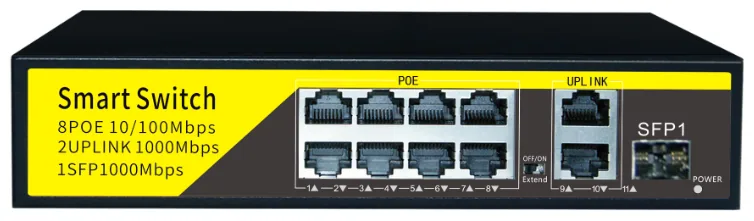
Same eight PoE ports and the same 120 W class budget as the PS082, with an added fibre uplink for a camera group that sits a long way from the recorder.
Models
PS082
standard8 PoE ports, 2 gigabit uplinks, 250 m extend mode.
- PoE ports
- 8
- Uplink
- 2 × gigabit RJ45
- Budget
- 120 W class
1011GB
entry8 PoE ports, 2 gigabit uplinks and a fibre uplink for a distant feed.
- PoE ports
- 8
- Uplink
- 2 × RJ45 + 1 × fibre
- Budget
- 120 W class
Both models are unmanaged and plug and play, with extend mode set by a front-panel DIP switch.
Technical specifications
PS082 technical specifications
| Downlink Ports | 8* 10/100Mbps RJ45 Auto-adaptive PoE Ports |
|---|---|
| Uplink Ports | 2 10/100/1000Mbps Gigabit Ports* (For NVR or Core Router) |
| Management Switch | One-key DIP Switch: Supports Extend / VLAN modes |
| PoE Protocol | IEEE 802.3af / IEEE 802.3at Standard |
| Transmission Distance | Standard Mode: 100m; Extend Mode: 250m |
| Plug and Play | No software configuration required; automatic device sensing |
| Forwarding Mode | Store and Forward |
| Backplane Bandwidth | 8.8Gbps (Full Duplex) |
| Power In | AC 110V-240V |
| Power Supply | DC 52V 120W (Internal Power) |
| PoE Output Voltage | DC 48V - 55V Wide Voltage Output |
| Signal Pins | 1, 2, 3, 6 (Data Transmission) |
| PoE Power Pins | 1, 2 (+) Positive; 3, 6 (-) Negative |
| Network Media | Cat5 / Cat5e or better (Pure copper cable recommended) |
| Reliability | Industrial-grade surge/lightning protection |
| Dimensions | 312mm (L) * 185mm (W) * 46mm (H) |
1011GB technical specifications
| PoE Downlink Ports | 8 x 10/100Mbps RJ45 PoE ports (Ports 1-8) |
|---|---|
| PoE Ports | Ports 1-8; all support Extend mode |
| Gigabit RJ45 Uplink | 2 x 10/100/1000Mbps RJ45 uplink ports |
| Gigabit Fiber Uplink | 1 x 1000Mbps SFP uplink port |
| Management Switch | One-key Extend/VLAN DIP switch |
| PoE Protocol | IEEE 802.3af / IEEE 802.3at |
| Transmission Distance | Standard Mode: up to 100m; Extend Mode: up to 250m |
| Forwarding Mode | Store and Forward |
| Backplane Bandwidth | 7.6Gbps, full duplex |
| Power Input | AC 110-240V input; DC 52V 120W internal output |
| Standard Power Supply | DC 52V 120W |
| PoE Output Voltage | DC 48-55V |
| Signal Pins | 1, 2, 3, 6 |
| PoE Power Pins | 1, 2 positive (+); 3, 6 negative (-) |
| Network Media | Cat5 or Cat5e unshielded twisted-pair cable or better |
| Installation | Unmanaged plug-and-play; no software configuration required |
| Dimensions | 202mm (L) x 140mm (W) x 45mm (H) |
Specifications are taken from the manufacturer data sheet for the model listed. Where a figure depends on the configuration you order, we confirm it in writing on the quotation rather than leaving it implied.
Frequently asked questions
How many cameras can an 8-port PoE switch power?
Eight, one per port, and the 120 W class budget covers eight fixed 5 MP cameras with sensible headroom. It also covers fewer cameras plus a wireless access point or a small PTZ. Add up the actual draw of everything on the switch and keep roughly 25 percent spare rather than filling it to the limit.
What is the difference between the PS082 and the 1011GB?
Mainly the uplinks. Both have eight PoE ports with a 120 W class budget and 250 m extend mode. The PS082 has two gigabit RJ45 uplinks; the 1011GB adds a fibre uplink, which is what you want when the switch is a long way from the recorder and copper will not reach.
Does an 8-port switch have enough uplink bandwidth?
Yes for eight cameras. Eight 5 MP channels at a realistic bitrate fit comfortably inside a single gigabit uplink. If you cascade several switches back to one recorder, check the aggregate on the shared link rather than the individual camera rate.
Can I put a PTZ on an 8-port switch?
Yes, but count its draw carefully. A PTZ with an illuminator and a heater has a peak draw several times that of a fixed camera, and its start-up surge is the moment that matters. One PTZ plus six fixed cameras is normally fine on a 120 W budget; two PTZs plus six cameras is worth checking against the specification before you commit.
What happens to a camera if the switch loses one port?
Only that camera stops. The rest keep running, which is the main advantage of PoE over a shared power arrangement — a single failed power supply takes every camera down at once. When a camera goes dark, check the port LED first: a dark port pointing at a live camera is usually the cable or the connector, not the camera.
Is the switch rack-mountable?
Desktop and wall mounting suit most 8-port installations in a communications cupboard. If you are building a rack, tell us the rack width when you order and we will confirm the mounting option for the revision we ship.
Plan Your CCTV or Video Wall Project
Send us the building type, floor count and camera estimate — we will come back with a system layout, a bill of materials and a price.