Recording
Network Video Recorders — 10 to 64 Channels
Ten, sixteen, thirty-two, forty-nine and sixty-four channel recorders on one firmware platform, with drive bays and bandwidth stated per model so the storage arithmetic is done before the order.
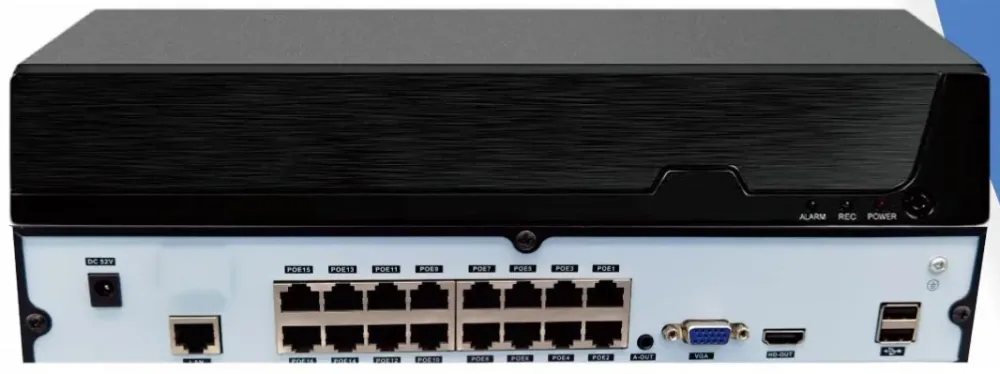
- 1 to 8 drive bays
- 14 TB or 18 TB per bay
- 4K HDMI output
- ONVIF and GB28181
Channel count is the last decision, not the first
Buyers usually start with the channel count and work backwards, which is how recorders end up undersized on storage. The order that works is: count the cameras, decide the retention period in days, work out the storage that requires, and only then pick the chassis that has both enough channels and enough drive bays.
A sixteen channel recorder with one bay and an eighteen channel requirement is a dead end. Move up a model rather than dropping the retention period — footage that has already been overwritten is not evidence.
The storage arithmetic
At 5 MP with H.265+, one channel costs roughly 8 to 15 GB per day depending on frame rate and how much motion there is. For a continuous thirty-day policy, sixteen channels therefore need between roughly 4 and 7 TB, and thirty-two channels between roughly 8 and 14 TB.
The formula is: gigabytes per channel per day × channels × days ÷ 1024 = terabytes. Multiply by 1.15 for the file system overhead and round up to the next drive size. Surveillance drives are rated for continuous write, which desktop drives are not — using a desktop drive is the classic false economy in this category.
Drive bays: the 10 and 16 channel models take one drive, the 32 channel model two, the 49 channel model four and the 64 channel model eight. The 10 and 16 channel models accept up to 14 TB per bay; the larger models up to 18 TB.
Bandwidth and the channel ceiling
Each model lists its incoming bandwidth, and that ceiling is what limits the channel count in practice. Sixteen channels at 5 MP with a generous bitrate can approach the figures a small recorder is built for, which is why the channel count and the bandwidth should be checked together rather than assumed to scale.
If you are recording at a low frame rate on most channels and full rate on a few important ones, the aggregate falls and the same chassis carries more. That is a legitimate design choice — identify the till, the entrance and the gate at full rate and let the perimeter run slower.
Using the recorder with cameras you already own
These recorders accept ONVIF, RTSP and GB28181 streams, so cameras from another manufacturer can be recorded without being replaced. That is the practical route when a building already has cameras and the recorder is what has reached end of life.
What changes when you mix brands is the convenience layer rather than the video: one app, one user list, one firmware path. Read the NVR migration page if that is your situation — it covers what carries over and what does not.
Drives and the rack they live in
Recording capacity is a drive decision before it is a channel decision. Surveillance drives are rated for continuous write, and the bay count is what caps your retention once the channels are fixed.

Recorder range
NVR10-1-2
entry10 channels, 1 drive bay, up to 14 TB per bay.
- Channels
- 10
- Drive bays
- 1, up to 14 TB
- Bandwidth
- 64 Mbps incoming
NVR16-1-2
standard16 channels, 1 drive bay, up to 14 TB per bay.
- Channels
- 16
- Drive bays
- 1, up to 14 TB
- Bandwidth
- 64 Mbps incoming
NVR32-2-2
standard32 channels, 2 drive bays, up to 18 TB per bay.
- Channels
- 32
- Drive bays
- 2, up to 18 TB
- Bandwidth
- per model data sheet
NVR49-4-2
flagship49 channels, 4 drive bays, up to 18 TB per bay.
- Channels
- 49
- Drive bays
- 4, up to 18 TB
- Position
- Mid-size to large site
NVR64-8-2
flagship64 channels, 8 drive bays, up to 18 TB per bay.
- Channels
- 64
- Drive bays
- 8, up to 18 TB
- Position
- Large site or campus
All models share the same firmware platform, the same H.265+ compression and the same client software, so a site can mix chassis sizes without splitting the management.
Selection guide
| Model | Channels | Drive bays | Max per bay | Typical site |
|---|---|---|---|---|
| NVR10-1-2 | 10 | 1 | 14 TB | Small office, clinic, shop |
| NVR16-1-2 | 16 | 1 | 14 TB | One commercial floor |
| NVR32-2-2 | 32 | 2 | 18 TB | Two floors or a mid-size site |
| NVR49-4-2 | 49 | 4 | 18 TB | Warehouse, campus building |
| NVR64-8-2 | 64 | 8 | 18 TB | Large site, multi-building |
Frequently asked questions
How do I choose between 16, 32 and 64 channels?
Count the camera positions, add roughly 15 to 20 percent for the ones that get added after fit-out, and pick the next chassis up. Then check the drive bays against your retention period: a 16-channel recorder with one bay cannot hold thirty days of sixteen 5 MP channels at a generous frame rate. Channel count and drive bays have to be chosen together.
How much storage do I need?
Use gigabytes per channel per day × channels × days ÷ 1024. At 5 MP with H.265+, budget 8 to 15 GB per channel per day depending on frame rate and motion. Thirty days of sixteen channels is therefore roughly 4 to 7 TB before overhead, so a single 8 TB surveillance drive is the practical minimum and 10 TB gives room to grow.
Can these recorders record cameras from another brand?
Yes. They accept ONVIF, RTSP and GB28181 streams, which covers the great majority of IP cameras. This is the normal route when a building already has cameras and only the recorder is being replaced. Confirm the specific camera model with us before ordering if the integration is critical to your decision.
Does it support 4K output to the video wall?
Yes, HDMI output supports 4K 3840 × 2160 as well as the usual lower resolutions, with VGA up to 1920 × 1080. The layout modes run from a single full-screen view to sixteen-way split, so a recorder can drive a local monitor directly without a separate matrix.
What AI detection is available?
The recorders support face, licence plate, humanoid, vehicle and high-altitude parabolic detection, with motion detection, IO alarm and AI-triggered recording as alarm linkages. How much of that you enable is a deliberate choice — every AI channel adds processing load, so it is better to enable it on the positions where a false alert is costly.
How many users can access the recorder?
Up to 38 local users are supported, with preview, recording, forwarding, remote service and alarm linkage available to clients. In practice most sites use far fewer and rely on role separation rather than a long user list — give operators view access and keep configuration to one or two accounts.
Plan Your CCTV or Video Wall Project
Send us the building type, floor count and camera estimate — we will come back with a system layout, a bill of materials and a price.