Tools — system planner
CCTV System Planner: How Many Cameras, PoE Ports, Recorder Channels and Cable
This page is the arithmetic behind a quotation, written so that you can do it yourself on a calculator. Work down the tables with your own building in hand — position count, retention days, resolution tier and the display layer — and you get camera numbers by building type, PoE ports and watts against real switch budgets, recorder channels and drive capacity in terabytes, CAT6 metres, and the share of budget each link takes. Where a table gives a range, take the lower end if you are checking a quote and the upper end if you are writing a budget.
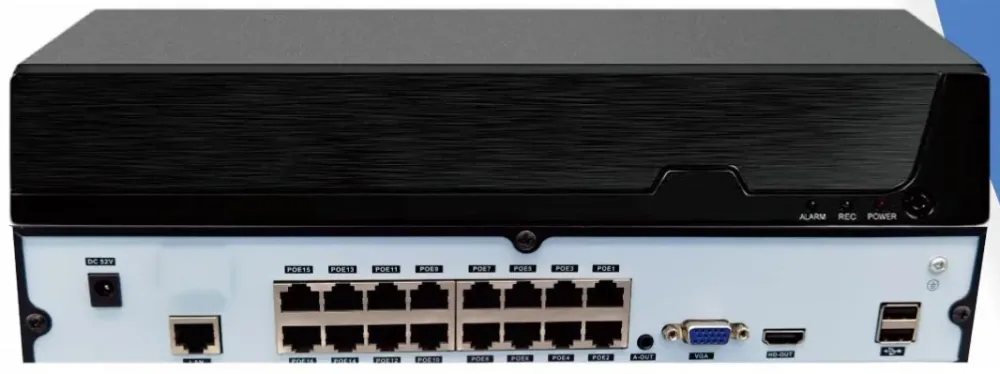
- Camera counts by building type and size
- PoE ports and watts against 120 W, 250 W and 320 W budgets
- Storage in terabytes from GB per channel per day
- CAT6 metres, and every formula written out
What you get
The output first, the process after. Every item maps to a line on the quotation.
- 01 Camera count by building type Position bands for eight building types at three sizes, with the rule for counting positions — entrances, lobbies, lifts, docks, tills, stores, lanes, perimeter — rather than estimating from floor area.
- 02 PoE port and wattage check Ports, budgets and usable watts for the PS082, PS162, PS242 and 24G02GS-P, with the 1.25 headroom formula and a worked example that shows why budgeting a port at the 802.3af ceiling undersizes the switch.
- 03 Recorder channel and storage sizing The five recorder models with channels, bays, per-drive ceiling and raw capacity, plus the storage formula and the GB-per-channel-per-day range that produces the terabytes.
- 04 CAT6 metre estimate Average run length by building type, the 1.15 loss factor, the 305 m box, and the 100 m and 250 m Extend-mode limits that decide where a cabinet has to go.
- 05 Budget share, not prices Indicative shares for each line of the bill of materials so a quotation can be checked for balance, with the installation labour line shown as excluded — local labour is quoted locally, by your contractor.
- 06 The five formulas in one place Storage, PoE, cable, channels and display, written out with worked examples so the whole plan can be re-derived on a calculator or handed to an engineer for review.
How to use this planner
Fill in five things for your building and the rest follows: how many camera positions there are, how many days of recording you need, which resolution each position runs at, roughly how long the average cable run is, and how the system is watched. Everything on this page is derived from those five answers and the specifications of the range — nothing else.
More detail
Work in this order, because each step feeds the next: positions first, then camera forms, then channels, then storage, then PoE ports and watts, then cable metres, then the display layer. Doing it in any other order is how a building ends up with a 16-channel recorder for 22 cameras, or a 120 W switch asked to feed sixteen cameras and a PTZ.
The planner gives you a defensible range and a set of sums you can show to whoever signs the budget. It is not a quotation. When the numbers are in, send them to us and we will return the design and the priced bill of materials against them.
Step 1 — how many cameras the building needs
| Building type | Small | Mid | Large |
|---|---|---|---|
| Office building | 8–16 (1–3 floors, single tenant) | 24–32 (4–10 floors) | 49–64 (11–30 floors, mixed tenants) |
| Apartment building | 8–16 (one block, up to 4 floors) | 24–32 (mid-rise) | 49–64 (multiple blocks) |
| Warehouse and factory | 8–16 (single shed) | 24–32 (multi-bay, plus yard and docks) | 49–64 (large plant or logistics site) |
| Retail and shopping mall | 8–16 (single store) | 24–32 (retail park or multi-floor store) | 49–64 (shopping centre) |
| Hotel | 8–16 (boutique) | 24–32 (100–200 rooms) | 49–64 (large or mixed-use property) |
| School and campus | 8–16 (single block) | 24–32 (two or three blocks) | 49–64 (four or more blocks) |
| Hospital and clinic | 8–16 (clinic or day surgery) | 24–32 (district hospital) | 49–64 (full hospital with perimeter and car parks) |
| Car park | 8–16 (surface lot or one level) | 24–32 (multi-level) | 49–64 (several lots or a large deck) |
- Count one position for each entrance and exit, each lift lobby, each lift car, each stair core at ground level, each reception and goods door, each dock face, each till or cash desk, each store room that holds value, each lane in a car park, and the perimeter corners that overlook the site.
- Choose the form by the position, not by the budget: the FC5B bullet for outdoor and approach positions, the FC5D dome for anything indoors and within reach where a vandal-proof housing belongs, and the FC5P-PTZ where one camera has to watch a whole yard, field or concourse and an operator will drive it.
- Both fixed cameras are 5 MP full colour low light with a 1/2.7-inch sensor and an F1.0 aperture, and both are supplied as 38 × 38 mm board-level modules with no protection rating of their own — so a housing line per outdoor or reachable position is part of the count, not an accessory.
- Do not add a percentage “headroom” to the camera count. Cameras cost money and are installed where a view is needed. Put the headroom on the recorder channels and the switch ports instead.
More detail
The camera count comes from functional positions: every entrance, every lift lobby, every lift car, each dock face, each till row, each lane, each perimeter corner that matters. The table below is what those positions usually add up to by building type and size, so that you can sanity-check a number you have counted — or start from a band if the plan is not drawn yet.
Step 2 — PoE ports and watts
| Switch | PoE ports | Power budget | Usable after 1.25 headroom | Per position at full port count |
|---|---|---|---|---|
| PS082 or 1011GB | 8 | 120 W | 96 W | 12 W |
| PS162 | 16 | 250 W | 200 W | 12.5 W |
| PS242 | 24 | 320 W | 256 W | 10.6 W |
| 24G02GS-P (all gigabit) | 24 | 320 W | 256 W | 10.6 W |
- Formula: PoE budget = Σ (per-position draw × number of positions) × 1.25 headroom, and the result has to sit under the switch budget.
- Worked example: twelve fixed cameras allowed at 10 W and two PTZ positions allowed at 20 W = 120 W + 40 W = 160 W of load; × 1.25 = 200 W, which fits the PS162’s 250 W budget with 50 W spare and two ports left free.
- Budget the draw, not the class. 802.3af reserves 15.4 W at the port and 802.3at reserves 30 W, but a switch with a 250 W budget can only average 12.5 W across its 16 ports once headroom is applied. Budget every port at 15.4 W and you will size the switch too small, then blame the cameras.
- Count cabinets, not buildings. A tower needs a cabinet roughly every six to eight floors, and each cabinet carries its own port count and its own wattage budget.
- Keep the PTZ positions on the port class you intend to run, and keep them away from a switch that is already close to its budget. A PTZ is the position that turns a comfortable design into a marginal one.
More detail
Ports are easy: one port per camera, plus one or two genuinely spare ports per cabinet. Watts are where systems get undersized, because the number that matters is not the port count on the front of the switch but the power budget behind it — 120 W on the 8-port, 250 W on the 16-port, 320 W on the 24-port — and it has to survive the headroom factor.
The per-position figures above are planning allowances for the arithmetic, not nameplate ratings: the cameras are specified with a DC 12 V 2 A input, which is the rating of the input rather than a consumption figure. Check the actual draw of the models you specify before finalising a 24-port budget, and leave the headroom in.
Step 3 — recorder channels and storage
| Model | Channels | Drive bays | Max per drive | Raw capacity | What it covers |
|---|---|---|---|---|---|
| NVR10-1-2 | 10 | 1 | 14 TB | 14 TB | A single small building, or recording at a lower resolution on some channels |
| NVR16-1-2 | 16 | 1 | 14 TB | 14 TB | 16 cameras at 5 MP for 30 days (4–7 TB), and 60 days at the lower end of the bitrate range on one drive |
| NVR32-2-2 | 32 | 2 | 18 TB | 36 TB | 32 channels for 30 days (8–14 TB) with headroom, or 60 days with 18 TB drives |
| NVR49-4-2 | 49 | 4 | 18 TB | 72 TB | Multi-block sites where groups of channels carry different retention periods |
| NVR64-8-2 | 64 | 8 | 18 TB | 144 TB | 64 channels for 30 days (15–29 TB) and long retention on critical channel groups |
- Channels = cameras × 1.15 to 1.2. Fourteen positions points at 16 channels; eighteen points at 32. A recorder run at 100% of its channel count has no room for the entrance nobody covered yet.
- The 10- and 16-channel recorders take one drive up to 14 TB; the 32-, 49- and 64-channel chassis take up to 18 TB per drive in 2, 4 and 8 bays. Above those ceilings, retention is a question of bays rather than of compression.
- Every model records at H.265+ / H.265 / H.264, offers 64 Mbps access bandwidth and HDMI up to 4K 3840 × 2160 with 1/2/4/6/8/9/10/16 split layouts, supports up to 38 local users, and speaks TCP/IP, DHCP, NTP, RTSP, P2P, SMTP, GB28181 and ONVIF.
- Group your retention rather than extending everything equally: 60–90 days on gates, tills, stores, docks and the pharmacy, 30 days on corridors and general coverage. It usually buys more useful retention for the same money than spreading the days evenly.
- Recording the sub-stream instead of the main stream multiplies retention at the cost of the detail you review. Decide per channel, not globally, and write the decision down.
More detail
Channels first, storage second, because they are decided by different things: channels by the camera count with headroom, and terabytes by the retention days you promised. Pick the chassis after both, using the bays and the drive ceiling as the constraint.
Storage formula: GB per channel per day × channels × days ÷ 1024 = terabytes. At 5 MP on H.265+ a channel produces roughly 8–15 GB per day, depending on how much motion crosses the frame and whether the illuminator is working at night.
Worked example: 16 channels × 12 GB × 30 days = 5,760 GB ÷ 1024 = 5.6 TB — comfortably inside one 14 TB drive in an NVR16-1-2. The same 16 channels at the top of the range, 15 GB per day, give 7,200 GB ÷ 1024 = 7 TB for 30 days, and 14 TB for 60 days, which is where the second bay starts to matter.
Step 4 — CAT6 metres
| Building type | Typical average run | What stretches it |
|---|---|---|
| Single-storey office, clinic or store | 20–35 m | A service corridor that runs the length of the building and a cabinet at one end of it |
| Low-rise office or shop, 1–4 floors | 25–45 m | One cabinet for the whole building, so the ground-floor runs are short and the top-floor runs are not |
| Office tower, 5–30 floors | 30–55 m per floor drop, plus one riser uplink per cabinet | Cabinet spacing on the riser: a cabinet every six to eight floors keeps every drop inside the 100 m limit |
| Warehouse and factory | 40–90 m | Long sheds, high bays, dock faces and a yard gate that is usually further from the cabinet than anyone expects |
| Hotel | 25–50 m per floor drop | Back-of-house routes that run as far as the guest corridors, with two cabinets doing most of the work |
| School and campus | 30–70 m | Block-to-block distances, which should be uplinks between cabinets rather than camera runs |
| Shopping mall | 30–60 m | Zone cabinets and ceiling routes around service corridors rather than through the retail space |
| Hospital | 30–60 m | Restricted areas that push the route around a department rather than through it |
| Car park | 40–90 m | Ramps, lane ends, column routes and perimeter positions on a large deck |
More detail
Cable length follows the route and the cabinet positions, not the camera count alone, which is why the same sixteen cameras can need 300 m in a low-rise office and 1,000 m in a long shed. Measure from the cabinet that serves the camera, not from the head-end room; the distance between cabinets is an uplink, and it is a different line in the bill of materials.
Formula: total metres = average run length × positions × 1.15 loss factor, then divide by the box length (305 m) and round up.
Worked example: 32 positions with an average run of 45 m = 1,440 m; × 1.15 = 1,656 m; ÷ 305 = 5.4 boxes, so order 6 boxes (1,830 m) and keep the remainder for the service loops and the runs that were longer than the average.
The 100 m limit applies to every one of these runs, and Extend mode reaches 250 m at 10 Mbps with port isolation on ports 1–8 of the PS series — useful for a gate, a perimeter pole or a sub-station, and unsuitable for a camera that has to sit in a multi-view wall with everything else. Add a 2–3 m service loop at each camera end and count it in the total.
Step 5 — the share of budget, and the formulas on one page
| Line in the bill of materials | Typical share | What moves it |
|---|---|---|
| Cameras, housings and mounts | 45–55% | Position count, the mix of dome, bullet and PTZ, and how many positions need a housing because the board-level modules carry no protection rating of their own |
| PoE switching | 12–18% | Cabinet count, port count and wattage headroom; a second cabinet for a distant block is a bigger step than a larger switch in one room |
| CAT6 cable and accessories | 7–11% | Average run length and the accessories that finish a run: conduit, glands, patch leads, mounts and service loops |
| Recorder and drives | 15–22% | Channel count and retention days; the drives are the part that scales directly with the retention target |
| Display layer | 4–10% | One operator with a 4K monitor on the recorder output sits at the bottom of the range; decoder cards in the 14-slot chassis and a control desk sit at the top |
| Installation and commissioning labour | Not in this total | Quoted locally. The cable and containment in the lines above are materials; labour, access equipment, power circuits and permits are your contractor’s scope, not ours |
- Storage: GB per channel per day × channels × retention days ÷ 1024 = TB. Sixteen channels at 12 GB per day for 30 days = 5,760 GB = 5.6 TB.
- PoE: Σ (per-position draw × positions) × 1.25 headroom ≤ switch budget. Fourteen positions at 160 W of load becomes 200 W, inside the PS162’s 250 W.
- Cable: average run length × positions × 1.15 = total metres; ÷ 305 = boxes, rounded up. Thirty-two positions at 45 m = 1,656 m = 6 boxes.
- Channels: cameras × 1.15 to 1.2, rounded up to the next model. Twenty cameras point at 32 channels rather than at a 16-channel chassis.
- Display: count the feeds an operator must see at once, not the channels that exist. One operator watching 8–32 channels is a 4K monitor on the recorder output; two operators or a permanently displayed group of gates and lanes is where decoder cards and a wall earn the money.
More detail
Cost share is more useful than a total when you are checking a quotation, because it shows which link is carrying the money. The ranges below are indicative shares of a building’s hardware and cabling bill of materials; they move with the building and they do not add to exactly 100 per cent, so read them as a check on the balance of a quote rather than as a price.
All five formulas are published so that they can be used on our quotation as well as on anyone else’s. Send the finished numbers to us — positions, retention, resolution tier, average run and display layer — and we will return the design and the priced bill of materials, with the assumptions marked, at /request-a-quote/.
Frequently asked questions
How many cameras does my building need?
Count functional positions rather than floor area: every entrance and exit, every lift lobby and lift car, each reception and goods door, each dock face, each till or cash desk, each store holding value, each parking lane, and the perimeter corners that overlook the site. As a sanity check, a 1–3 floor office usually lands at 8–16 positions, a 4–10 floor building at 24–32, and an 11–30 floor building at 49–64, with warehouses, mall floors, hotels and campuses landing in the same bands for the same reasons. The table on this page gives the bands for eight building types; if you send us the plan we will count the positions properly.
How much storage do I need for a given number of cameras?
Use one formula: GB per channel per day × channels × days ÷ 1024 = terabytes. At 5 MP on H.265+, budget 8–15 GB per channel per day depending on how much motion crosses the frame. Sixteen channels for 30 days is therefore 3.8–7 TB; 32 channels for 30 days is 7.5–14 TB; 64 channels for 30 days is 15–29 TB. Then check the ceilings: the 10- and 16-channel recorders take one drive up to 14 TB, and the 32-, 49- and 64-channel chassis take up to 18 TB per drive in 2, 4 and 8 bays. Add a little headroom for growth, and size from the retention target rather than from the largest drive on the shelf.
How do I work out the PoE power budget?
Add up the draw of every device on the switch, multiply by 1.25 for headroom, and check the result against the switch budget: 120 W on the 8-port, 250 W on the 16-port, 320 W on the 24-port. As an example, twelve fixed cameras allowed at 10 W and two PTZ positions at 20 W come to 160 W of load, which becomes 200 W with headroom and fits a PS162 with 50 W to spare. The trap is budgeting every port at the 802.3af reservation of 15.4 W: 16 ports at that figure is 246 W before headroom, which does not exist on a 250 W switch once you leave room for the night illuminators and the ones you add later.
How many metres of CAT6 will the job take?
Average run length × positions × 1.15, then divide by 305 m per box and round up. Thirty-two positions averaging 45 m come to 1,440 m, plus 15% for routing and waste is 1,656 m, which is six boxes. The average run length is where the estimate lives or dies: a single-storey office averages 20–35 m per drop while a warehouse or a car park deck runs 40–90 m, and the same thirty-two cameras can need 700 m or 2,000 m depending on which one you are building. Measure from the cabinet that serves the camera, add a 2–3 m service loop at each end, and remember that the distance between two cabinets is an uplink, not a camera run.
What is the difference between 30, 60 and 90 days of retention?
It is a straight multiplication of the storage figure, and it is the second largest cost driver on most projects after the camera count. Sixteen channels at 5 MP need about 4–7 TB for 30 days, 8–14 TB for 60 and 12–21 TB for 90. The practical answer is usually not to extend every channel equally: give the gates, tills, stores, docks, pharmacy and cash offices 60 or 90 days, and keep corridors, aisles and general coverage at 30, because the channels that settle disputes are a small fraction of the total. That pattern fits the 32-channel and larger chassis, which take 18 TB drives across two to eight bays.
Plan Your CCTV or Video Wall Project
Send us the building type, floor count and camera estimate — we will come back with a system layout, a bill of materials and a price.